
Pending orders are instructions to open a trade later, only if price reaches a specific level you choose in advance. Instead of entering immediately at the current market price, you set the order and let the platform execute it if the market moves into your planned zone.
That is why understanding the types of pending orders matters. A trader who knows only market execution may chase entries, react late, or enter before confirmation. A trader who understands pending orders can plan pullback entries, breakout entries, stop-loss placement, and risk before the trade is live.
In forex, the main pending order types are buy limit, sell limit, buy stop, and sell stop. Some platforms also offer stop limit orders, but the four core order types are enough for most day traders, swing traders, and funded-account traders. The key is not memorizing the names. The key is knowing when each order makes sense and when it can create avoidable risk, especially when you’re trading on PropLynq funded accounts!
What Is a Pending Order in Forex?
A pending order in forex is a trade order that waits in the trading platform until the market reaches the price condition you set. If that condition is met, the order becomes an active trade. If price never reaches that level, the order does not open unless you manually adjust it, cancel it, or let it expire.
This makes pending orders different from market orders. A market order enters immediately at the best available price. A pending order delays execution until price reaches a planned level. That delay can be useful because it forces the trader to define the setup before the emotion of live execution begins.
Pending orders are commonly used for two broad ideas: trading a pullback or trading a breakout. A pullback trader wants price to move back into a better entry area. A breakout trader wants price to prove momentum by passing through a key level first. The order type changes depending on whether the trader wants to buy or sell, and whether the entry is above or below current price.
For funded traders, this distinction is more than technical. On a challenge account, a poorly placed entry can affect drawdown, stop distance, and daily loss exposure. PropLynq’s evaluation rules state that drawdown checks include floating and realized P&L, so open trades can matter before they are closed. That makes entry planning especially important for traders using pending orders inside a rules-based account.
The Four Main Types of Pending Orders
The four main types of pending orders are buy limit, sell limit, buy stop, and sell stop. Each one answers three questions: do you want to buy or sell, is your entry above or below current price, and are you trading a pullback or a breakout?
| Pending order type | Direction | Entry location | Typical use |
|---|---|---|---|
| Buy Limit | Buy | Below current price | Buying a pullback into support or value |
| Sell Limit | Sell | Above current price | Selling a rally into resistance or premium |
| Buy Stop | Buy | Above current price | Buying after a bullish breakout |
| Sell Stop | Sell | Below current price | Selling after a bearish breakdown |
A simple way to remember the difference is this: limit orders usually expect price to come back to you, while stop orders usually expect price to continue after breaking a level. Limit orders are often associated with better price. Stop orders are often associated with confirmation.
Buy Limit Order: Buying Below the Current Price
A buy limit order is used when you want to buy, but only if price drops to a lower level first. You are saying, “I do not want to buy here. I want to buy cheaper, if the market pulls back.”
For example, imagine EUR/USD is trading at 1.0850, and your analysis shows support near 1.0800. You do not want to chase the current price. You place a buy limit at 1.0800. If price falls to that level, the platform attempts to open a buy trade. If price never reaches 1.0800, the trade does not open.
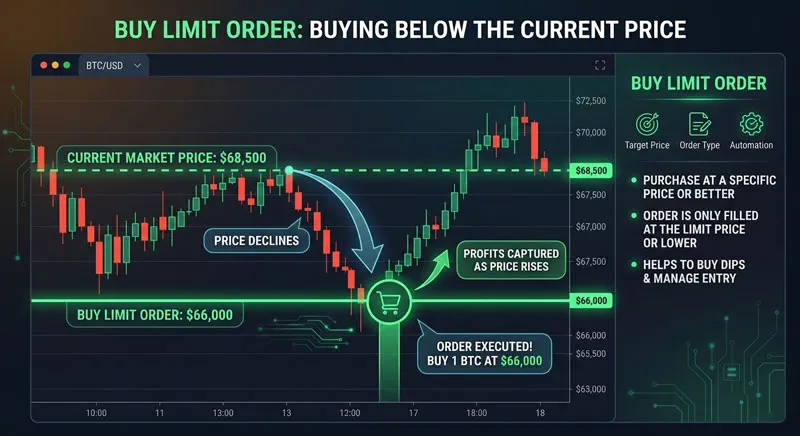
Buy limits are common around support zones, Fibonacci retracements, moving average pullbacks, and previous breakout levels that may turn into support. They suit traders who want a better entry price and are comfortable entering before the market confirms a fresh move upward.
The risk is that price may reach your buy limit because the market is genuinely weak, not because it is offering a clean pullback. A buy limit can catch a good dip, but it can also catch a falling market. That is why the stop loss and invalidation level matter more than the entry price itself.
Sell Limit Order: Selling Above the Current Price
A sell limit order is the opposite of a buy limit. It is used when you want to sell, but only if price rises to a higher level first. You are saying, “I do not want to sell here. I want to sell at a better price if the market rallies into resistance.”
For example, GBP/USD is trading at 1.2650, and your analysis shows resistance near 1.2700. You place a sell limit at 1.2700. If price rises to that level, the platform attempts to open a sell trade. If price falls away before touching the level, no trade is opened.
Sell limits are commonly used around resistance, supply zones, retests of broken support, or the upper edge of a range. They fit traders who believe price may temporarily move higher before rejecting and turning lower.
The danger is similar to the buy limit problem. Price may not reject the level. It may break through and keep moving. A sell limit is not automatically safer because the entry looks “expensive.” If the trend is strong, selling into strength can become a fast drawdown event.
Buy Stop Order: Buying Above the Current Price
A buy stop order is used when you want to buy only if price moves above a certain level. You are not trying to buy cheaper. You are waiting for confirmation that the market has broken higher.
For example, USD/JPY is trading at 154.20, and resistance sits near 154.60. You believe a break above 154.60 could trigger momentum. You place a buy stop at 154.65. If price trades up into that level, the platform attempts to open a buy trade.
Buy stops are often used for breakout strategies, continuation entries, news-driven momentum setups, and entries above recent highs. They can help traders avoid entering too early when price is still trapped below resistance.
The trade-off is entry quality. A buy stop gives more confirmation, but usually at a worse price than a buy limit. The trader may also face slippage if price moves quickly through the entry level. That is why a breakout entry should be planned with spread, volatility, and stop distance in mind. For a deeper look at execution risk, the PropLynq guide on slippage in forex is a useful companion topic.
Sell Stop Order: Selling Below the Current Price
A sell stop order is used when you want to sell only if price moves below a certain level. You are waiting for the market to break down before entering short.
For example, AUD/USD is trading at 0.6420, and support sits near 0.6380. You believe a break below support could lead to downside continuation. You place a sell stop at 0.6375. If price reaches that level, the platform attempts to open a sell trade.
Sell stops are common below range lows, below trendline breaks, below recent swing lows, or under support zones where sellers may gain control. Like buy stops, they are confirmation-based orders rather than pullback-based orders.
The main risk is a false breakdown. Price may trigger the sell stop, push slightly lower, and then reverse back into the range. This is why many traders add filters such as session timing, candle close confirmation, spread limits, or volatility checks before using stop entries.
Limit Orders vs Stop Orders: The Practical Difference
Limit and stop orders solve different trading problems. A limit order focuses on price improvement. A stop order focuses on confirmation. Neither is automatically better. The best choice depends on the setup.
| Feature | Limit orders | Stop orders |
|---|---|---|
| Main idea | Enter on a pullback | Enter after a breakout |
| Entry quality | Usually better price | Usually later price |
| Confirmation | Less confirmation before entry | More confirmation before entry |
| Common risk | Catching a market that keeps moving against the order | Getting triggered by a false breakout |
| Best fit | Mean-reversion, support/resistance, pullback trading | Breakout, momentum, continuation trading |
If your plan is to buy support, a buy limit may be logical. If your plan is to buy strength after resistance breaks, a buy stop may be logical. If your plan is to sell resistance, a sell limit may fit. If your plan is to sell weakness after support breaks, a sell stop may fit.
Many mistakes happen when traders use the right order name for the wrong idea. Placing a buy stop above resistance is not the same as placing a buy limit at support. One is paying for confirmation. The other is trying to enter before confirmation at a better price.
How to Choose the Right Pending Order
The simplest way to choose between the types of pending orders is to start with the trade idea, not the order menu. Ask what the setup requires from price before you want to be involved.
- Use a buy limit if your plan is to buy a pullback below current price.
- Use a sell limit if your plan is to sell a rally above current price.
- Use a buy stop if your plan is to buy after price breaks above a level.
- Use a sell stop if your plan is to sell after price breaks below a level.
Then check the practical details. Where will the stop loss go? Is the distance too wide for your risk per trade? Is the spread normal? Is a major news event about to release? Is the pair liquid during the current session? These checks matter because a technically correct pending order can still be a poor trade if the execution environment is bad.
Currency pair selection matters too. Major pairs often have tighter spreads and better liquidity than exotic pairs, but each pair behaves differently by session and news cycle. Traders who are still choosing their core markets may want to read PropLynq’s guide to major forex currency pairs before building a pending-order strategy around a pair they barely know.
Common Pending Order Mistakes
The first common mistake is placing a pending order at an obvious level without thinking about liquidity. Many traders place buy stops just above the same high or sell stops just below the same low. Sometimes that works. Other times the level gets swept, triggers orders, and reverses. A level being obvious does not make it reliable.
The second mistake is forgetting to attach a stop loss. A pending order is not a full trading plan by itself. It only defines the entry. Without a stop loss, position size, and invalidation point, the order is incomplete.
The third mistake is using pending orders to avoid responsibility. Some traders place several orders around the market and hope one works. That is not planning. That is spreading emotional risk across multiple tickets. If the trader cannot explain why an order belongs at a specific level, it should not be there.
The fourth mistake is ignoring expiration. A setup that looked valid during the London session may no longer be valid hours later. If structure changes, the pending order may become stale. Many traders use expiration settings or manual reviews to prevent old orders from triggering in a new context.
The fifth mistake is using stop entries during fast news without accounting for slippage. PropLynq allows news trading in its listed challenge rules, but traders still remain responsible for the execution and risk consequences of their own entries. That distinction is important: permission to trade does not remove market risk.
Pending Orders in a Funded Trading Account
Pending orders can be useful in a funded trading account because they create structure. They force the trader to decide the entry level, stop distance, risk amount, and trade idea before execution. That can reduce impulsive clicking, especially during volatile sessions.
However, funded-account traders should treat pending orders carefully because risk rules still apply once the trade is active. On PropLynq, the trading accounts page lists challenge models with defined profit targets, daily loss limits, maximum drawdown limits, minimum trading days, leverage, and unlimited time depending on the account type. That means the order is only one part of the decision. The account rule environment matters too.
For example, a breakout trader using buy stops may need to account for wider spread and faster movement around the entry. A pullback trader using buy limits may need to avoid stacking several limit orders that increase total exposure if price keeps falling. A swing trader using sell limits or sell stops may need to think about weekend gaps, swap, and open-position risk.
This is why a pending order should be sized from the stop loss, not from confidence. The better question is not “How sure am I?” The better question is “If this order triggers and fails, does the loss still fit the account rules?” Traders comparing rule structures can review the current PropLynq trading accounts page before choosing which account model best matches their execution style.
Pending Order Checklist Before You Place the Trade
Before placing any of the types of pending orders, run a quick checklist. It does not need to be complicated. It only needs to catch the mistakes that usually create unnecessary losses.
- Is the order type correct for the idea: pullback or breakout?
- Is the entry level based on structure, not hope?
- Have you already defined the stop loss?
- Does the position size fit your maximum risk per trade?
- Is the spread acceptable for the pair and session?
- Is high-impact news likely to affect execution?
- Will the order still make sense if it triggers later?
- Should the order have an expiration time?
- Does the worst-case loss fit your account rules?
If one of these answers is unclear, the order probably needs more work. Pending orders are powerful because they automate execution, but they do not automate judgment.
Final Thoughts on the Types of Pending Orders
The four main types of pending orders are easy to name but harder to use well. A buy limit buys below current price. A sell limit sells above current price. A buy stop buys above current price after a breakout. A sell stop sells below current price after a breakdown.
The real skill is matching the order type to the strategy. Limit orders suit traders who want better prices on pullbacks. Stop orders suit traders who want confirmation through a level. Both can work, and both can fail when used without risk planning.
For funded traders, the cleanest approach is to treat every pending order as a complete trade plan: entry, invalidation, position size, execution risk, and account-rule impact. If the order cannot survive that review, it does not belong in the market yet. If it can, a pending order can turn a reactive idea into a structured trade.
Leave a Reply